For those who don’t already know, iTween is a great tweening library for Unity. If you haven’t yet had a chance to use it, go download it. I guarantee that you will find it useful.
Now that introductions are out of the way, on to the point at hand. Many code libraries (especially tweening libraries) have the problem that there is no access to code hinting for properties being passed into it’s functions. The reason being since there are so many possible parameters that could be past into each function a list of optional parameters are requested instead of a sequentially list of required parameters. This makes using these functions a lot easier and more customizable. The downside is there is no coding hinting for what parameters could be possible passed in.
In the case of using iTween in C# you pass arguments into a Hashtable and that Hashtable is then in turn passed into the these functions.
Example:
Hashtable tweenHash = new Hashtable(); tweenHash.Add("x", -5); tweenHash.Add("y", 5); tweenHash.Add("time", 10); iTween.MoveAdd(gameObject, tweenHash); |
Or as a single line (if using Unity 3.0 or greater):
iTween.MoveAdd(gameObject,new Hashtable(){{"x",-5},{"y",5},{"time",10}}); |
Or an even shorter single line (does have additional creation overhead)
iTween.MoveAdd(gameObject,iTween.Hash("x",-5,"y",5,"time",10)); |
The only way to know what the list of possible parameters are for a particular function is to either a) open iTween’s source and look at the comments or b) look through the iTween documentation.
Since this slows down learning and speed of using a new library I set off to try to find a better way. After exploring some different options I think I have found a better way. I wrote an app that goes through the iTween library and creates a Helper class called iT (contained within iTweenHinting.cs). Using this class you will have the ability to access code hinting/discovery when using iTween.
For example:
Hashtable tweenHash = new Hashtable(); tweenHash.Add(iT.MoveAdd.x, -5); tweenHash.Add(iT.MoveAdd.y, 5); tweenHash.Add(iT.MoveAdd.time, 10); iTween.MoveAdd(gameObject, tweenHash); |
Or as a single line (if using Unity 3.0 or greater):
iTween.MoveAdd(gameObject,new Hashtable(){{iT.MoveAdd.x,-5},{iT.MoveAdd.y,5},{iT.MoveAdd.time,10}}); |
Or even shorter single line (does have additional creation overhead)
iTween.MoveAdd(gameObject,iTween.Hash(iT.MoveAdd.x,-5,iT.MoveAdd.y,5,iT.MoveAdd.time,10)); |
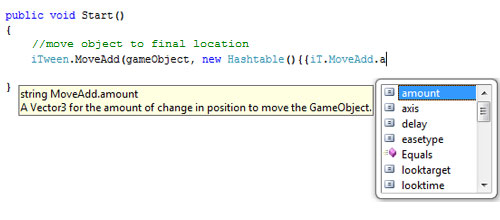
When you type ‘iT.’ within a code editor it will give you a list of all tweening functions within iTween. Once you select the function you wish to use (ex: MoveAdd), hit ‘.’ and your code editor will then give you a list of all possible parameters for that function (see image above).
The great thing about this method, is as you get more comfortable with the iTween you can write out the strings of the simple and easy to remember parameters, while still having the ability to fallback on the helper class.
To download iTweenHinting.cs click here (right-click save as).
Note: While I don’t expect the list of functions and parameters within iTween to change that often. I will do my best to keep iTweenHinting.cs up-to-date.
If you have any suggestions on ways I could improve/change iTweenHinting.cs please leave them in the comments below.
Interesting side note: For this project I wrote code that reads code to write code that allows you to write code faster. Plus it was AS3 that was reading and writing C#. Isn’t programming fun. 



24 Responses to "iTween Parameter Code Hinting"
I haven’t had a chance to use this yet but it looks like a boon to productivity.
Of course, C# 4.0 added named/optional parameters. When/if Mono and Unity get up to that version, the C# version of iTween will probably be rewritten again to have a much cleaner interface. http://msdn.microsoft.com/en-us/library/dd264739.aspx
Brilliant! Let me know if you are up to putting this into iTween itself. If not I’ll be sure to keep you up-to-date if anything changes, Great Stuff!
@Tetrad
Yes the moment Unity and Mono support C# 4.0 I’m certain support for named parameters will be added (sadly that is a long time from now). This is my interesting work around in the meantime. I hope as you said it is a “boon to productivity”.
@pixelplacement
I’m glad you like it. I would definitely be up to finding a way to putting it into iTween itself. I will drop you a line and we talk about that further.
I promise that as soon as named params are acmvailable for Unity iTween will get them.
This will be VERY helpful while getting used to iTween. Thank you for your hard work.
I have a question though, how do I install this “cs” file? Do I install it in MonoDevelop, or from within Unity, or both/neither?
@Blenderificus Just like iTween.cs all you need to do is drop anywhere in your project and it just works. To have access to code hinting you will also need to be using an editor that supports that (ex: Visual Studio, MonoDevelop).
Thanks Devin!
It doesnt work with me, it says:
the name iT does not exist in the current context.
im using unity 3.0 and mono any ideias??
Never mind that….. figured out 5 min after posting :S
I have never gotten this to work, I’ve tried monodevlop and visual studio. I have the file in the plugins folder along with the itween.cs
I am no C# expert so there has to be something I am doing wrong
Note: It will accept my code in the iT. format, but no code hinting has ever popped up and I have it on in both ide’s
Hi Eric
As you have tried Visual Studio I assume you are coding in C#. If that is the case you do not need to put iTweenHinting.cs in a plugins folder. But that would not prevent code hinting from working.
Does code hinting work for other c# classes?
Ok I realized that I wasn’t getting code hinting from Unity3D as well. I realized that this doesn’t work with Visual Studio Pro 2005 but only Visual Studio 2008, I downloaded the express version and it worked. Thanks for the quick reply and help! This parameter code hinting is great
@Eric I’m glad you got it figured out and I hope my library helps make you life easier.
Thanks very much for this. I know it’s not a big deal to get a thank you, but your efforts and sharing are greatly appreciated!
thanks a lot for this script, it seems to be very useful!
my problem is that i can´t make it works I program in javascript and I have put the script in the Plugins folder, inside Helper Classes subfolder.
I should put it in other folfer?
thanks!!
Hi @igorlean,
I do not think there is a way to use MonoDevelop to do autocomplete in UnityScript from a C# libraries. That said I’m not an expert in UnityScript.
Are you ever going to do iTween auto-complete for javascript? Its no real big issue, but it would be nice.
Hi @Phil,
Sorry, no I do not plan on doing that. Main reason being I very strong encourage people to use C# instead of UnityScript.
I found this EXTREMELY useful. I was starting to pull my hair out over the hashtables then found this. Much obliged! Did this ever officially get added to iTween?
Hi @Disastercake
Not official, but a link to it was added to the iTween ‘Getting Start’ Page – http://itween.pixelplacement.com/gettingstarted.php
I’m glad you are finding it useful!
Hi (usual thanks for very handy library!)
Any chance you’ll be updating this great library with ignoretimescale parameter? (I don’t know if there are others — that’s the one I keep missing.) If not, would you accept an offered updated version with the changes made?
Thanks!
We’ve since migrated all of our tweening to use GoKit (https://github.com/prime31/GoKit). I highly recommend checking it out.
Holy cow this is amazing thank you!