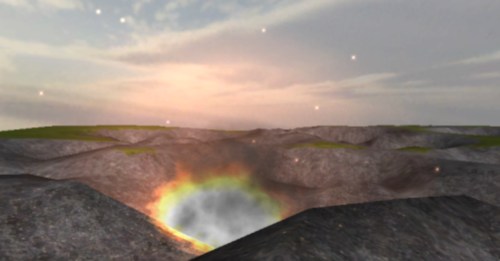
A few weeks back I got thinking. Would it be possible to have a terrain within Unity deform in real-time? For example if an explosion went off, could it blow a hole in the terrain? I decided this would be a good project to learn the more ‘advanced’ features of Terrains within Unity.
It ended up being more challenging than I predicted, as it was difficult to get the framerate to remain stable while performing these operation. Using a few tricks I ended up getting it to work exactly as I had hoped.
The demo works like this. A script randomly spawns ‘shells’ that fall quickly to the ground. Each shell has an onTrigger collider attached to it. If this collides with a terrain that has a TerrainDeformer component, the shell tells that component its location and the force of the explosion. The shell then instantiate an explosion (supplied by Ben Throop great Detonator framework), and removes itself.
The TerrainDeformer script then translates that position to the correct location relative to it’s terrain and modifies both the heightmap (terrain height) and the alphamap (terrain texture). A bit of math is used to find all the heightmap and alphamap position within the area of the impact circle.
The texture which is used to re-texture the impact area is chosen from the list of terrain textures based on the numerical index value passed into the script (Terrain Deformation Texture Num). In this example it is set to one, so it will re-texture with the second texture in the list.
When creating your own terrains it is necessary for the height of the terrain to be higher than 0 meters so craters can be formed. I recommend a depth of at least 3 meters. This can done by setting the terrain height to something higher than 3 meters, then clicking Terrain->Flatten Heightmap and entering 3 meters.
For performance reasons it is important to keep your terrain size small and more importantly keep your Heightmap Resolution low. In this example it is set to 33.
The current version does have limitations like lack of terrain edge detection and support for multiple terrains. This example is more of proof of concept to show that not only can it be done, but done without much of a performance hit.
Thanks to Calin for creating the dirt texture.
To check out the demo click here.
To get the source (unitypackage) click here.
Source Requirements: Unity 2.6 and the Detonator Framework.



24 Responses to "Real-time Terrain Deformation in Unity3D"
This will be very helpful and time saving to look at. I want to have buildings and other things break and deform too in an open world game idea I have. Keep up the good work!
nice one. thanx!
I am looking for a way to crumble terrain. do you know a way for this, too?
@headkit I don’t know exactly what you mean by crumble. If you mean make ‘crater’ slowly, well yes you could using the same technique. That being said editing the terrain at runtime is performance hog. So lots of small changes can impact performance.
Can I use this to try to build one of my own I have an idea and a few modifications that would allow this to work perfectly for an idea I have and 9 feet would be plenty was estimating 3 feet for performance reasons seriously doe exactly what I was looking for so please
Hi Devin. This post is pretty nice. I have a question here:
I tried your demo and I feel that the depth of the crate depends on the ‘terrain height’ of the terrain. For example, if the height is 6, the crate is fleet and if the height is 60, then the crate will be very deep. I wonder if it is possible that when the height is 60 and I can make some shallow crates just like when the height is 6?
I modified the codes and nothing changes and the properties of terrain in Unity 3d really confused me. Can you offer some help here? Thanks.
Hi Devin, it was my mistake. Please ignore my last post.
Wow, awesome! Thank you sooooooo much!
Nice i look for a script or a way to cut holes in the mesh of teh terrain for make a dungeon entrance any ideas?
Hi @markus
Depending on what you are wanting you might be able to use a shader to not render part of the terrain and a tunnel model to achieved that effect. If you are wanting to do this a lot might want to look into using voxel terrain or modelling all terrain without the editor.
Hi,
Much thanks. I’m in the process of designing a game where the players can modify the terrain (i.e. build traps for other players/AI agents to succumb to).
I’m not familiar with Unity3D at all, but is there object inheritance (specifically for properties, methods etc…). Main reason is that I originally did some coding on a LPMUD a while ago.
Thanks again,
A.
I’m working on a game where users can build building using basic parts that snap. But if I can’t create holes in terrains or blocks (for floors and windows), multi-floor buildings suddenly get very complicated :-\
Hi,
I tried your package on an existing project of mine, and noticed that my terrain got replaced with another, which i do not like at all. How do i get it back? I worked hours on that and just because i wanted to try it does not mean that it should delete/deform/replace my shit.
@NAnou
That’s why you should never import packages into your working projects. That’s why you should create backups of your work. These are general rules that apply to any sort of workflow. The fault here lies with you, fella.
Normal people would respectfully backup a project before importing new assets.
Would you have an updated version of this Demo? Unity 4.2 doesn’t seems to execute it.
@Dan Sorry I do not and I do not have time at this moment to look into the issue. If you or someone else determines the issue please let me know.
Works on 4.5.3f
Satu ini adalah foto termewah yang pernah ambo panyau hiongga hari ini.
gw juga menyukai hasil sepakbolawebsite segera lihat ke http://Www.nuGoal.Com
//This code is written by myself. maybe it can help you.
using UnityEngine;
using System.Collections;
using System.Collections;
using System;
using System.Collections.Generic;
using System.ComponentModel;
using System.Linq;
using System.Text;
public class terrain : MonoBehaviour {
bool shouldDraw = false;
public Terrain myTerrain;
TerrainData tData;
int xResolution;
int zResolution;
float[,] heights;
public float speed = 0.01f;
string speedString;
void OnGUI(){
if (GUI.Button (new Rect (Screen.width / 200, Screen.height / 200, 50, 50), “DrawHeight”)) {
shouldDraw = true;
}
if (GUI.Button (new Rect (Screen.width / 200, Screen.height / 200 + 55, 50, 50), “EndDrawing”)) {
shouldDraw = false;
}
speedString = GUI.TextField (new Rect (Screen.width / 200, Screen.height / 200 + 110, 60, 20), speedString, 4);
}
// Use this for initialization
void Start () {
speedString = speed.ToString();
tData = myTerrain.terrainData;
xResolution = tData.heightmapWidth;
zResolution = tData.heightmapHeight;
heights = tData.GetHeights (0, 0, xResolution, zResolution);
}
// Update is called once per frame
void Update () {
speed = Convert.ToSingle (speedString);
if (shouldDraw == true && Input.GetMouseButton (0) && Input.GetKey (KeyCode.RightControl)) {
RaycastHit hit;
Ray ray = Camera.main.ScreenPointToRay(Input.mousePosition);
if(Physics.Raycast( ray, out hit)){
raiseTerrain(hit.point);
}
}
if (shouldDraw == true && Input.GetMouseButton (1) && Input.GetKey (KeyCode.RightControl)) {
RaycastHit hit;
Ray ray = Camera.main.ScreenPointToRay(Input.mousePosition);
if(Physics.Raycast( ray, out hit)){
lowerTerrain(hit.point);
}
}
}
private void raiseTerrain(Vector3 point){
int mouseX = (int)((point.x / tData.size.x) * xResolution);
int mouseZ = (int)((point.z / tData.size.z) * zResolution);
float[,] modHeights = new float[1, 1];
float y = heights [mouseX, mouseZ];
y += (speed / 10) * Time.deltaTime;
if (y > tData.size.y)
y = tData.size.y;
modHeights [0, 0] = y;
heights [mouseX, mouseZ] = y;
tData.SetHeights (mouseX, mouseZ, modHeights);
}
private void lowerTerrain(Vector3 point){
int mouseX = (int)((point.x / tData.size.x) * xResolution);
int mouseZ = (int)((point.z / tData.size.z) * zResolution);
float[,] modHeights = new float[1, 1];
float y = heights [mouseX, mouseZ];
y -= (speed / 10) * Time.deltaTime;
if (y < 0.0f)
y = 0.0f;
modHeights [0, 0] = y;
heights [mouseX, mouseZ] = y;
tData.SetHeights (mouseX, mouseZ, modHeights);
}
}
Can I just say what a comfort to discover somebody that
truly knows what they’re talking about on the net.
You definitely know how to bring a problem to light and make it important.
More people must look at this and understand
this side of the story. I was surprised you’re not more popular because
you most certainly possess the gift.
Hi,
I would like to propose the link exchange deal with your website blog.almostlogical.com, for mutual benefit in getting more traffic and improve search engine’s ranking, absolutely no money involve.
We will link to you from our Music and Entertainment authority site – https://www.loudthings.org/, from its homepage’s sidebar. In return you will agree to do the same to link back to one of our of our Music & Entertainment Site, from your blog.almostlogical.com’s homepage too (sidebar, footer, or anywhere on your homepage), with our brand name Guitar Junky.
If you are interested, kindly reply to this email.
Thank you,
Charles
Hi,
I would like to propose an advertising deal with your company, blog.almostlogical.com.
We run a site that’s currently getting around 80,000+ monthly visitors. Most content are targetting buyer keywords.
Our audience are mostly from US, UK, and Canada who are ready to learn and buy any product in the music niche.
These could be your potential customers. We can help you reach your target customers.
If you’re interested to know more, kindly reply on this email.
Thanks,
Charles V.
Hi,
I would like to propose an advertising deal with your company, blog.almostlogical.com.
We run a site that’s currently getting around 80,000+ monthly visitors. Most content are targetting buyer keywords.
Our audience are mostly from US, UK, and Canada who are ready to learn and buy any product in the music niche.
These could be your potential customers. We can help you reach your target customers.
If you’re interested, kindly reply on this email.
Thanks,
Charles V.